

 EL
EL


OLED Screen Repair: 5 Tips for a Successful Repair
06-01-2026 • Χρόνος ανάγνωσης: 2 min

OLED screens are popular because they deliver super-bright colors and deep blacks. But they are also delicate for technicians. One wrong move can lead to extra costs and unhappy customers. In this blog, we take a close look at the most common repair mistakes and provide practical solutions to avoid them.
 Banner 1.png 220.8 KB
1. Maintain the Correct Temperature During Disassembly
Many technicians use the same heat settings as they do for LCD screens. This can be a problem because OLED panels are thinner and more sensitive. Too much heat can cause:
- Warped screen
- Damaged touch layer
- Green or white lines
How to prevent it:
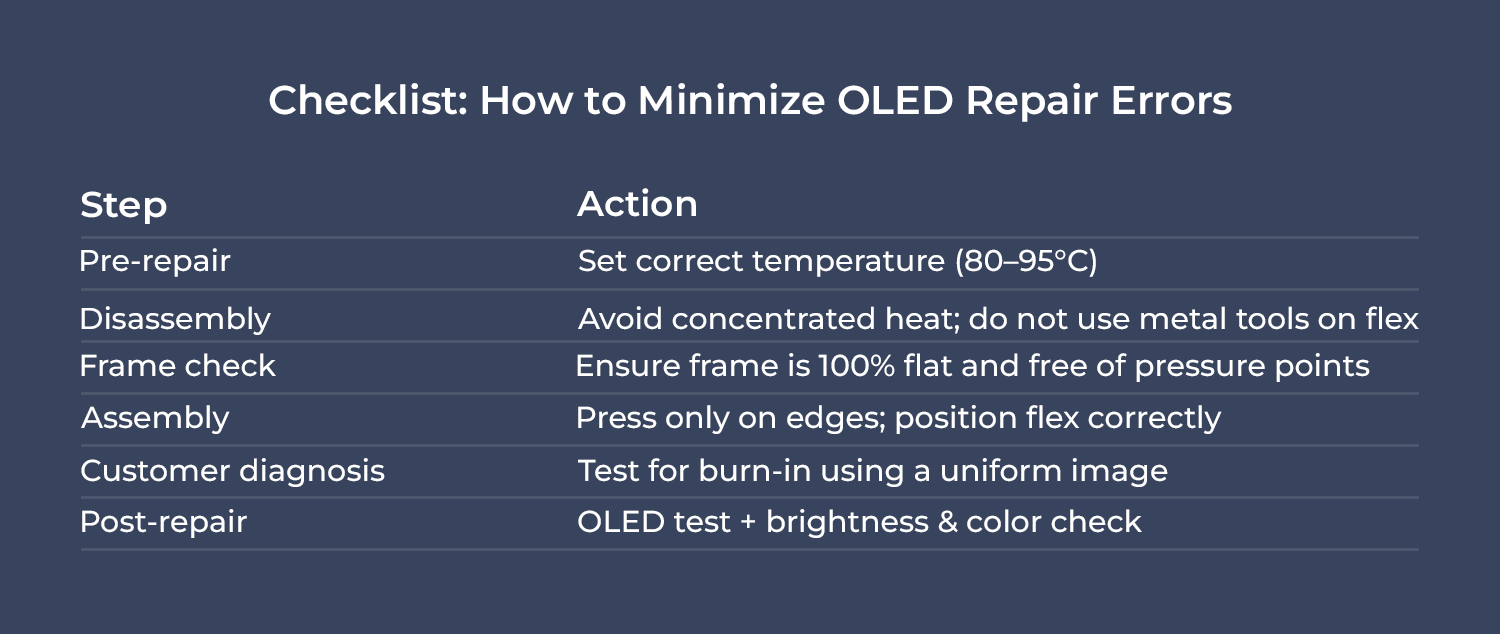
✔ Work with controlled heat between 80–95°C
✔ Use pre-heating mats or a stable hotplate
✔ Avoid pointing the heat gun at one single spot
 Banner 2.png 331.56 KB
2. Apply Pressure Correctly to Prevent Damage
OLED screens have no backlight and are therefore very thin. Applying too much pressure can cause micro-cracks that lead to problems later, such as:
- Black spots
- Pixel bleeding
- Partial display failure
How to prevent it:
✔ Press only on the edges, never in the center
✔ Use foam pads or frame-alignment tools to distribute pressure evenly
✔ Check that the frame is flat before installing the screen
 Banner 3.png 102 KB
3. Handle Flex Cables Safely
A common mistake is thinking the flex cable is stuck, so it gets pulled. This can lead to:
- Loose connectors
- Touch issues
- Intermittent display-fouten
How to prevent it:
✔ Always check the correct folding direction of the flex cable
✔ Never pull on the cable
✔ Use plastic spudgers instead of metal tools
 Banner 4.png 51.02 KB
4. Recognize Burn-In Correctly
Burn-in or image retention is normal for OLED screens, but it is often mistaken for a defect. Unnecessary replacement can lead to:
- Extra costs for the customer
- Wasted screens
- Lower profit margins for you
How to prevent it:
✔ Test the screen with a uniform white or gray image
✔ Explain to customers that burn-in is a natural characteristic of OLED
✔ Provide tips to prevent burn-in, such as using dark mode
 Banner 5.png 57.02 KB
5. Check the Frame for a Perfect Installation
After a drop, the old screen is often damaged, but the frame can also be slightly bent. Installing a new OLED screen on a warped frame can cause:
- Cracks
- Light leakage
- Pressure points
How to prevent it:
✔ Use a frame straightening tool or replace the frame
✔ Check for pressure points before applying adhesive
✔ Test the installation without glue first
 Tabel 2.png 57.22 KB
We offer a wide range of displays for various phone brands. Check them out here.
Conclusion
Repairing OLED screens is different from working with LCDs. Pay attention to heat, pressure, flex cables, and the frame. Test for burn-in and provide your customers with clear explanations. With the right parts and techniques, you can work faster, safer, and more profitably.
Also check out our other three blogs about OLED: 1, 2, 3.
Stay up to date with the latest developments and updates by reading our blogs and following us on LinkedIn.


